Time back at reception
A full group export becomes print-ready labels in minutes, not a block of handwriting before guests walk through the door.
PrintKey
Select → Paste → Print → Done
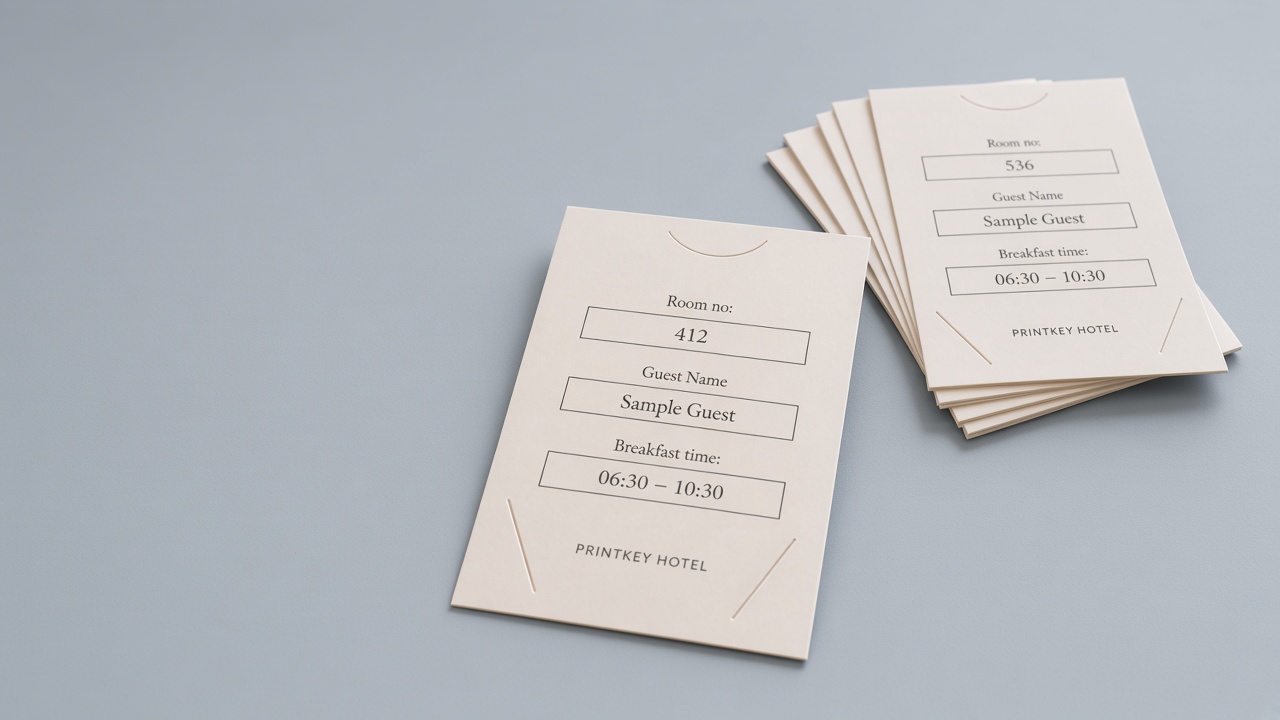
Turn a MEWS group export into printed keycard holder labels, so the desk stages keys in minutes, stays calmer for guests, and keeps the table presentation clean.
Used at Clarion Hotel The Pier and Clarion Hotel Karlatornet.
Who it’s for
Front desk feels the relief first. Operations sees control. Leadership sees time and focus returned to the guest.
Front desk
Paste the MEWS export, print the holders, clip the keys. Less fiddly prep, more headspace when the lobby gets busy.
Front office / FOM
Uniform labels, findable layout, fewer last-minute corrections. The team can shift attention back to guests and the rest of the shift.
GM / operations
Less time on manual label prep and rework. A calmer desk and a neater first impression. That is the kind of operational detail a regional conversation understands.
The problem
Guest names are already in MEWS. Yet before a conference group arrives, front desks still apply stickers or copy names by hand for dozens of keycard holders (sleeves) laid out on a table.
Preparing 50 or 100 keycard holders by hand takes focused desk time that could go to guests already in the building.
Manual copying brings spelling mistakes and uneven formatting, especially with international names.
Labels are often the first thing guests see on the table. You want a clean, uniform look, not one-off handwriting.
Live workflow
Watch the desk workflow as a compact preview. Expand for a larger landscape view.
Scroll here or press Start demo.
What changes
PrintKey is built for the moment a group is due in and every keycard holder label needs to be right the first time.
A full group export becomes print-ready labels in minutes, not a block of handwriting before guests walk through the door.
Guest names come from the same MEWS export you already use. Review the list, adjust if needed, then print the entire group at once.
Sticker labels often mean exporting, spreadsheets, and several steps in another program before anything prints. PrintKey is paste, collect, print. Straightforward to pick up and easy to hand over to staff with access.
What you get
Software, hardware prepared remotely, and remote onboarding. One package so your team can start printing labels during real group arrivals.
Less manual work at the desk when a full group needs labels before arrival.
Names from your MEWS export, formatted the same way every time you print.
A fixed workflow your team can follow, even when the desk is under pressure.
Brother USB printer, prepared remotely and calibrated for your property before it ships.
Consistent label stock sized for your keycard holders.
Runs in the browser. No Excel, no desktop software to maintain.
Guest lists stay on your front desk computer, not in a central PrintKey database. How we handle guest data
Pricing & plans
Start with a one-month pilot, or implement the full system. Either way, you test PrintKey with your own group arrivals before you commit long term.
All prices excl. VAT (moms).
Try it for a month
3,500 SEK
Not sure PrintKey is right for your hotel? Test it for one month during your own group arrivals and see how it fits your front desk.
19,900 SEK One-time implementation
The complete go-live package: hardware prepared remotely and shipped to you, remote onboarding, and your first year of PrintKey software.
Custom quote
For hotels with requirements outside the standard PrintKey workflow.
Not sure which setup fits? We will help you pick the right onboarding and printer configuration during the planning phase. For the cost of a pilot, you can see how PrintKey works with your own arrivals before deciding.
Guest data
A short overview. For the full explanation, see our privacy page.
Arrival lists are handled on the front desk computer during label generation. They are not sent to PrintKey servers for printing or storage.
PrintKey does not keep guest names or room lists in a database for printing or later retrieval.
Guest information stays on screen only while staff are working. It is cleared on logout, session timeout, or when the list is cleared.
FAQ
Hardware, onboarding, pilots, and how staff get access. If something is missing, ask us when you apply.
PrintKey is browser software for Nordic hotels. It turns a MEWS group export into printed A7 keycard holder labels, so the front desk can stage keys without stickers or handwriting.
Layout is set per hotel stock: room, name, breakfast, and optional group name in millimetres, with an optional frame around a field when the holder has no printed window for it.
It helps most when several groups arrive in a short period, or when names are international and hard to get right on every label.
You can also use PrintKey for smaller tasks, such as printing breakfast times for regular check-ins, not only full group label runs.
Key staging is printing guest names on keycard holders (sleeves), putting the keys in, and laying the group out on a table for pickup. Many hotels do this overnight, or just before a conference group comes back from their session.
PrintKey handles the printing from MEWS. That is usually the slow part of the job.
PrintKey uses a standard Brother printer, not a dedicated label printer. It is a normal office printer, prepared for the A7 keycard-holder inlay.
The printer is prepared and calibrated remotely for your property before it ships, including the paper path and layout for the holders. Your team connects it by USB at reception or in the back office. With the PrintKey System package, the prepared printer and remote setup are included.
Many hotels already have a large multifunction printer in the building, with several paper trays and formats. Those machines are not a good fit for PrintKey.
PrintKey is built around a compact Brother printer and the A7 inlay that sits in its tray. That inlay needs a simple, short paper path. Large office printers have a longer, more sensitive path to the print zone. A7 stock jams more easily there, and the error messages often cannot be cleared without the manufacturer.
We tested printers for this workflow. Brother came out as the most reliable: simple enough to be less fault-prone, and the best fit for the A7 inlay.
The printer connects by USB to the computer your team uses at reception or the back office, the same workstation where staff paste the MEWS export and generate labels.
PrintKey runs in the browser on that computer. No separate print server is required.
The A7 inlay is a small module that fits in the paper tray of a standard Brother printer.
It holds A7-format label stock sized for your keycard holder in the right position so labels feed and print correctly. Without the inlay, a standard office printer is not set up for this label format.
The inlay is part of the prepared PrintKey hardware setup.
PrintKey generates a print-ready PDF in the browser. Your team reviews the labels, then prints using the normal print dialog (Cmd+P / Ctrl+P) and selects the correct printer.
PrintKey does not send jobs silently to a printer. Your team always confirms the printer and layout before printing.
Start with the matching guide. Layout and calibration are in Printer layout settings for A7 holders. Paste and collect are in Using a MEWS export for label prep.
Toner, paper, USB, and Settings stay with the hotel. If PrintKey or the printer is unavailable, use your usual backup for that run.
Existing hotels can write to us via the contact form. We reply by email. There is no phone line. More on Use and support.
PrintKey is built for the MEWS export workflow used at most Nordic hotels today. It is a separate tool: not part of MEWS, not a MEWS integration, and not connected through Reconnect or an API. Staff copy the export from MEWS and paste it into PrintKey.
If you use another PMS or have special requirements, choose Custom Setup on the pricing page. We will discuss whether your export format can be supported.
No, not for label printing. Guest arrival lists are processed on your computer during the active session. They are not uploaded to PrintKey servers for storage or printing.
For more detail, see how we handle guest data on this page.
The Pilot Program (3,500 SEK) is a one-month evaluation during real group arrivals at your property.
It typically includes remote onboarding, workflow review, hardware preparation, shipping, email support, and testing with your own arrivals.
If you continue with the PrintKey System, the pilot fee is fully credited toward that purchase.
If you choose not to move forward after the pilot evaluation period, your access to PrintKey software is cancelled at the end of the pilot.
The printer and A7 inlay must be returned to PrintKey. Return shipping is at the hotel's expense.
Before closing the pilot, we will review with you why it did not work out and whether adjustments to the workflow, setup, or training could still make PrintKey fit how your team operates.
If you later want to try again, we can discuss a new pilot or a different setup path.
The PrintKey System (19,900 SEK, one-time implementation) is the complete remote go-live package for one hotel property:
Your team connects the printer by USB at reception or in the back office. Setup and walkthrough are done remotely, not on site.
After the first year, the annual renewal is 14,900 SEK per property for the 2026–2027 license year.
This covers continued software access, updates, support, and the property license for one year.
When you start with PrintKey, your renewal rate for the next license year is confirmed upfront. We do not change the price halfway through an active license period.
For future years, we publish renewal rates before each calendar year. If your renewal falls in a new year, we will confirm the rate with you in good time before it renews.
Onboarding is remote and guided. It happens with the FOM or another person responsible for PrintKey. A typical path:
You do not need IT to install desktop software. The desk uses a web browser and the hotel desk account (Google). The manager uses their own login for settings.
The front desk uses the hotel desk account set up for that property, on the reception computer. The whole team signs in with that reception login, not with a personal email.
Access is not open on the internet. Only the accounts PrintKey has linked to your hotel can sign in.
PrintKey has Settings for printer layout. Those are only on the manager account. The desk account is for daily printing.
This is a setup step with the FOM (or the person responsible for PrintKey), not something the whole team does on a live shift.
When they sign in with the hotel desk account for the first time, PrintKey shows Access Denied. That first attempt is required. After it, PrintKey can connect the account to your hotel. Once that is done, they sign in again and access works.
We do the same for the manager account before you go live. That login is the one that can open Settings. The desk account is for printing only.
On a live shift, the whole team should sign in with the hotel desk account (the reception login), not with a personal email. A personal Google account is not connected to the hotel, so PrintKey shows Access Denied.
You do not add each receptionist. The desk account stays; people on shift use that.
If the hotel email or the manager changes, tell PrintKey and we update those accounts.
PrintKey only runs on app.printkey.se. Always check the address bar in your browser before signing in. The connection should show a padlock icon and the address should start with https://app.printkey.se.
PrintKey will never ask for your password by email, WhatsApp, or phone. The only sign-in method is the Google button on the login screen at app.printkey.se.
If you receive a link that looks similar but goes to a different address, do not sign in. Close the page and go to app.printkey.se directly.
If something looks off, contact your manager or reach out to PrintKey.
Get started
Whether you want to start with a pilot, the full PrintKey System, or a custom setup, we will help you plan the right path.
Pilot evaluations, full system implementation, and custom setups for Nordic hotel operations.